One human CEO.Ten AI departments.
An AI studio built the way people build companies: a Chief of Staff to run the day, and ten departments, each with a head, specialist AI workers, each with written instructions for its job, and the outside tools a real department would use.

Built like a company
One person decides. One desk keeps the day in order. Ten departments of specialists do the work.
1
The CEO
One human. Answers the questions, reviews every mock, approves every gate.
1
Chief of Staff
Routes every new issue to the right department, keeps the day in order, and sets up each new product's repository and folder.
10
Department heads
Ideation to Marketing. Each head plans the work and asks the CEO.
46
Specialists
Claude sub-agents, each on the model that fits its job.
69
Skills
All the studio's written playbooks: how each head and specialist does the work.
11
Outside tools
Godot, ComfyUI, Fastlane, Firebase and more: what a department would otherwise buy in.
The flow
From an issue on GitHub to the app on the CEO's phone, in ten steps.
The CEO lodges an issue
An idea, a bug or a feature goes into GitHub as one issue, in plain words. No labels, no template.
Opentreasure chests buried in the world 1 map? #142
CEOCEO opened this issue · just now
would be cool if players could dig up a chest on some tiles. gold or gems inside maybe
The Chief of Staff routes it
It rewrites the issue into a clear title and checklist, then labels who owns it and who needs to know.
treasure chests buried in the world 1 map?
Add a buried treasure chest tile to World 1 #142- CS
Chief of Staff added dept:design fyi:marketing prio:p1
- A buried chest tile on World 1 ground
- Placeholder first, painted once the CEO approves
- CS
The head asks the CEO
The department head breaks the work down and asks quick multiple-choice questions, so the CEO never has to write a brief.
Head of Design asks · 1 of 2
Where should the chest be buried in World 1?
- ABeside the start path (Recommended)
- BNext to the gold vein
- CBehind the castle wall
Mock first
A mock goes to the CEO to refine. Nothing is built until the CEO is happy with it.
HDHead of Design commented
ceo:reviewChest tile: placeholder and painted. Approve it, or ask for another pass.

Before · placeholder 
After · painted Specialists build it
Specialists build it once, for Android first. The same code can later ship on iPhone and Steam.
Openfeat(map): buried chest tile #151
HEHead of Engineering wants to merge 6 commits into
developmentfromfeat/142-buried-chest4 files+214 −12
shared/commonMain/…/ChestTile.kt+128−0shared/commonMain/…/WorldMap.kt+38−9assets/chest-painted.pngnewandroidApp/…/MapScreen.kt+48−3
Kotlin Multiplatform · Compose
Departments tell each other
Design tells Marketing what changed; Game mechanics tells Balancing. The right desk hears it without the CEO passing notes.
HDHead of Design commented on #142
fyi:marketingNote to Marketing: the chest tile art is final, so use it in store screenshots.
chest-painted.png Quality checks
Build, tests, lint and review run on every change, and all of them have to pass before anyone asks the CEO.
All checks have passed4 successful checks
- buildSuccessful in 3m 12s
- tests186 passed in 1m 48s
- lintNo issues
- reviewApproved by 2 reviewers
The CEO approves
The CEO sees the finished change and approves it, or sends it back with one more question answered.
CEOCEO approved these changes
Tried it on my phone. The chest tile looks right.
Straight to the phone
The test version lands on the CEO's phone over Wi-Fi, no cable. Once the store account exists, every build also goes to Google Play's private testing.
$ adb pair 192.168.1.24:37099
Enter pairing code: 482913
Successfully paired
$ adb connect 192.168.1.24:5555
connected to 192.168.1.24:5555
$ ./gradlew :androidApp:installDebug
Installing APK 'androidApp-debug.apk'
Success
BUILD SUCCESSFUL in 41s
Play ConsoleInternal testing, once the store is set up
On the CEO's phone
The app opens on the CEO's own phone, and they try it the way a user will.

Step 1 of 10
Volumes
Three weeks of real work.
- issues and pull requests
- 1,648
- pull requests merged
- 858
- issues closed
- 531
- commits
- 1,732
Across eight apps and the studio itself, from 15 Oct to 12 Nov 2026.
Pull requests
Remove an item and re-rank today's outfit
Wardrobe app · #173 · merged 8 Nov
Account deletion page on Firebase Hosting
Fishing app · #292 · merged 8 Nov
Shorter tower range, more and cheaper towers, kill gold x1.5
Game · #476 · merged 7 Nov
App Store listing: attach the newest build to the editable version
Day-out app · #190 · merged 7 Nov
Issues
Fallback rows get a source tap-through and licence link
Fishing app · #295 · opened 8 Nov
Location plugin is never built or packaged, so approximate location can't work on Android
Wardrobe app · #163 · opened 8 Nov
Where they stand
Eight apps, two stores.
How many of the studio's apps sit at each stage, on Google Play and the App Store.
- Android
- 2
- 1
- 2
- 3
- iPhone
- 4
- 0
- 2
- 2
Counted from each app's store tracks on 12 Nov 2026.
From people using it
Less context. More projects at once.
“The aiceo tools and workflows are redefining AI development. By pulling everything into GitHub, it's easier and faster to plan and work on my projects, and it's made it possible to actively work on several at once without blowing up my usage limits.”
“Most AI setups drag the whole company into every task, and you pay for it in tokens. aiceo only sends the department whose job it actually is, with the few rules that matter right now. Everything lives on GitHub issues, so a session reads one issue instead of relearning the whole project.”
How a session runs
Pick the departments. Clear. Start again.
The CEO doesn't talk to ten departments. Every session starts with the Chief of Staff, and every session ends clean.
Start with the Chief of Staff
It routes new issues, then asks the CEO everything waiting on them, one multiple-choice question at a time.
The CEO picks the departments
One question: which departments work this session. The busiest unblocked queue is recommended, or run every department with work, in order.
Each head works in turn
The chosen heads run one after another on their own queues. Between heads, the Chief of Staff writes down where things stand.
Tidy up after every task
When a change merges, its spare copies and finished branches go. Each product keeps its main line and at most one change waiting for review. Anything unfinished is the CEO's call.
Clear and start again
With the handoff saved, the CEO clears the conversation and starts fresh through the Chief of Staff. Every session begins clean, and nothing is lost.
> /aiceo:chief-of-staff
Routed 3 new issues: #142 Design, #145 Engineering, #147 Marketing
2 questions answered. Nothing else waits on you.

Which departments should work this session?
❯ 1. Design, 4 ready (recommended)
  2. Engineering, 3 ready
  3. Marketing, 1 ready
  4. All with work, in that order

Design head: 3 issues done, 1 mock waiting for your review
Handoff written to .factory/handoff.md

Safe to /clear now. Then run /aiceo:chief-of-staff continue.

> /clear
> /aiceo:chief-of-staff continue
Read the handoff. Next up: Engineering, 3 ready.
Not agentic programming. A company.
- Agentic programming
- A studio built like a company
- The unit of work is a prompt to a coding agent.
- The unit of work is an issue, owned by a department.
- A developer steers the agent, turn by turn.
- The CEO makes the decisions. The Chief of Staff and the heads run the work.
- It writes code.
- It builds the whole product: idea, design, art, balance, marketing and release.
- It knows what the model knows, plus the prompt.
- Every role has written skills, the way a company writes down how each department works.
- Its memory is one conversation that fills up and drifts.
- Its memory is handoffs and GitHub, so every session starts clean.
Every department is on call.
The CEO decides. The Chief of Staff, on call at the lit centre, routes each issue to one of ten heads, and the head runs its specialists. Open a department to see who works there and the skills they use.
Ten departments · 46 specialists · 69 skills
- The CEOThe one human. Answers questions, reviews every mock, approves every gate.
- Chief of StaffRuns each session and routes every issue to one department head. For a new product, it checks the CEO's computer has the tools the build needs, then creates the private repository, clones it into a folder on that computer and switches the studio on inside it, all after the CEO approves the plan. It can also sweep every product for anything a finished task left behind.
-
What the CEO seesNo mock: the review round is always a round of pointed questions from the department head, run in the session. The second round shows a quality score and an originality check alongside the draft brief.
- Head of IdeationOpus
studio-ideationGrills the CEO on each idea, has it scored and checked for originality, and hands an approved intent to Spec.
studio-ideation:grill-meGrills the CEO one multiple-choice question at a time until an app or game idea has no open branches, then writes the approved intent.- Outside toolgrill-me methodOne-question-at-a-time interviews that shape every idea
studio-ideation:idea-scorecardScores an app or game idea against the studio rubric and gives a go, reshape or park verdict.
studio-ideation:originality-checkChecks an idea against the references the CEO named and the closest store comparables, lists what to steal and what to avoid, and flags name, trademark and copying risks.
- Decision recorderHaiku
Writes answers into
intent.mdand the issue
-
What the CEO seesThe spec outline and milestone list, refined with the CEO before the full spec is written.
- Head of SpecOpus
mobile-productShows the CEO a spec outline and milestone list to refine, then has the spec, plan and backlog written and fans issues out to departments.
Outline only
mobile-product:product-ownerTurns an app idea into approved intent, spec, plan and roadmap docs, then GitHub milestones and self-contained issues, interviewing one question at a time.
- Spec writerOpus
mobile-product:product-owner - Milestone graphFable
mobile-product:product-owner(plan step) across departments - Issue formatterHaiku
Issue bodies and labels per issue-templates.md
mobile-product:documentationWrites and maintains an app repo's README, docs index, CONTRIBUTING, CHANGELOG and code docs, and keeps docs matching the code.
-
What the CEO seesThe greybox build on the CEO's device. Before building, grill what the proof must show and what may be faked.
- Head of Proof of conceptOpus
studio-pocAgrees with the CEO what the proof must show, runs engine spikes and greybox builds, and has the CEO try the build on a device.
studio-poc:engine-spikeAnswers one risky technical question with timeboxed throwaway builds of 2 or 3 candidates, measured on a device, and writes docs/poc/spike-<slug>.md with a recommendation.
studio-poc:greyboxBuilds the first playable or clickable greybox of the core loop, installs it on a device and posts a short recording for the CEO, with docs/poc/greybox.md listing what it proves and what is fake.
-
What the CEO seesFor an app, one function-first direction, built on the design system, which always comes before any screen. For a game, 2 to 3 concept directions, never a safe, bold and wildcard ladder. Placeholder art follows in the chosen direction, and ComfyUI runs only after the CEO picks, starting with a sample batch. Restyled screens arrive as before and after screenshots, only after a visual audit and an independent UX review pass.
- Head of DesignOpus
mobile-designSlop first: every plan, mock and build is checked against one anti-slop list before any other review. Every mock the CEO sees carries a UX critique score, and a design gate blocks device installs and pull requests on a restyle until the visual audit and an independent UX review pass. Every screen gets a designed loading, empty, error and offline state. Keeps Marketing and Audio told.
Tokens before screens, anti-slop skills picked by situation, Material 3 and Liquid Glass guides, a WCAG 2.2 AA checklist
mobile-design:design-systemCreates an app's design system as tokens.json and docs before any mock, with a function-first first direction and a quick-mock mode built on a Material 3 screen kit.- Outside toolClaude DesignDesign systems and mockups, first pass of every look
- Outside skillsSlop.md, frontend-design, UI/UX Pro MaxAnti-slop checks, with a table of which to load for each situation
mobile-design:art-directionSets a game's or app's art direction, the asset rules and code-drawn placeholder art, after a CEO-picked Claude Design style board.- Outside toolClaude DesignDesign systems and mockups, first pass of every look
CEO's Mac
mobile-design:comfyui-pipelineTurns approved placeholder art into painted art with the CEO's local ComfyUI, sample batch first, then atlas by atlas into the painted folder.- Outside toolComfyUI (local)Painted art from approved placeholders, on the CEO's own machine
mobile-design:asset-lintChecks art files against design/asset-rules.json and that painted art mirrors the classic sources with the same silhouettes.
mobile-design:design-handoffGenerates Compose and SwiftUI themes from the approved design/tokens.json and restyles the proof-of-concept screens with them, then audits the built screens against the current app and runs an accessibility pass.
mobile-design:web-directionSets a website's art direction: concept directions as one-screen mocks for the CEO, then browser checks at three widths once the page is built.- Outside skilltaste-skillWebsite art direction and a real-browser taste check
mobile-design:ux-critiqueScores screens and flows on a weighted 10-part UX rubric and writes the top fixes. Nothing reaches the CEO below 80 or with a blocker.
-
What the CEO seesAn architecture sketch before structural work, or a screen recording of the change on a device before close.
- Head of EngineeringOpus
Shows the CEO an architecture sketch or a screen recording to refine, then has the code written, reviewed and watched through CI. Every screen shows one clear state, loading, empty, failed or ready, gives up waiting after 15 seconds, tries again when the phone reconnects and shows an offline banner.
The head also draws on
local-ciSets up make targets that run the same locally and in GitHub Actions on a self-hosted Mac, with quiet logs and required checks.performanceMeasures and improves app startup, jank, memory and size against budgets and Play vitals, using Baseline Profiles, Macrobenchmark, R8, XCTest metrics and MetricKit.securitySecures KMP apps to OWASP MASVS v2, covering secure storage, TLS, tokens, permissions, privacy manifest and Play data safety.
mobile-engineering:architectureDesigns a KMP app's architecture and writes docs/architecture.md.
app-factory:implementerwhen installed, else the skill the issue names (kmp,api,testing, ...)kmpScaffolds and builds Kotlin Multiplatform apps with shared logic, Compose on Android and SwiftUI on iOS.apiImplements client-side networking in shared Kotlin with Ktor, covering docs/api.md, DTOs, token refresh, retries, error mapping and MockEngine tests.testingPlans and writes coordinated unit, snapshot and UI tests for KMP apps, with one shared matrix, shared test tags and journey ids across Android and iOS.
- Reviewers
The stage reviewers in quality-loop
- GitHub monitorHaiku
CI status and failed-job summaries
-
What the CEO seesA rule sketch with a headless simulation run or a greybox clip, refined with the CEO until it feels right.
- Head of Game mechanicsOpus
game-mechanicsShows the CEO a rule sketch with a simulation run or greybox clip to refine, then has the rules, data and harness built and Balancing told.
game-mechanics:godot-architectureDesigns a Godot 4 game's architecture and writes docs/architecture.md.- Outside toolGodot 4Game engine for rules, simulation and builds
Rule sketch
game-mechanics:data-driven-rulesTurns a game mechanic from the design document into a rule sketch the CEO plays with, then into game/data JSON, a JSON Schema, cross-file validator rules and a typed engine-light core class.
game-mechanics:sim-harnessBuilds and runs a Godot game's headless simulation harness - bot players at set skills, seeded runs over every level, one JSON line per result and a report that balancing and review rounds read.- Outside toolGodot 4Game engine for rules, simulation and builds
- Sim runnerHaiku
Runs harness batches and summarises the JSON lines
-
What the CEO seesThe simulation scorecard before and after the proposed change, with the levels it moves. Grill the CEO on difficulty intent when the spec doesn't settle it.
- Head of BalancingOpus
game-balancingShows the CEO simulation results before and after each proposed change, runs the autopilot campaign, and keeps the economy ledger even.
game-balancing:balance-specWrites a game's balance spec with the CEO - difficulty intent per level and world, graded simulation targets, the change ladder, never-do rules, a short rules digest and per-level briefs.
- Campaign plannerFable
Plans an autopilot campaign across levels and reads its results
One fix per session
game-balancing:balance-autopilotGrades a game's sim report against docs/balance/targets.json, ranks a balance backlog, then fixes one item per fresh session and shows the CEO the scorecard before and after.
- Sim runner and scorecard parserHaiku
Runs batches, grades and ranks the backlog
game-balancing:economy-ledgerKeeps a game's economy ledger - every currency's sources and sinks, designed supply against demand per player profile, and what campaign sims actually earn, spend and leave unspent.
-
What the CEO sees2 or 3 short samples per sound or theme. The CEO picks or asks for another round; nothing is produced in bulk before a pick.
- Head of AudioOpus
studio-audioPlays the CEO 2 or 3 sample options per sound or theme to choose and refine, then has the approved cues produced to the mix rules and Marketing told.
studio-audio:audio-directionSets a product's sound identity and the cue list, after grilling the CEO and playing 2 to 3 sample options per key sound.
studio-audio:sfx-music-pipelineProduces a product's sound effects and music from the approved cue list, with a licence ledger, loudness normalising, platform formats and an audio lint.
- Loudness and format checkerHaiku
Checks loudness, formats and the licence ledger
-
What the CEO seesThe draft listing, screenshot set and release notes for the store and track in question.
- Head of PublishingOpus
mobile-releaseShows the CEO the draft listing, screenshots and release notes to refine, then ships to Google Play, the App Store or Steam behind the CEO's approval.
mobile-release:listing-asoWrites store listing text and compliance answers as fastlane metadata, optimised for search.- Outside toolFastlaneBuilds, signing and store uploads for Android and iOS
mobile-release:store-assetsProduces store visuals into fastlane folders.- Outside toolClaude DesignDesign systems and mockups, first pass of every look
- Outside toolFastlaneBuilds, signing and store uploads for Android and iOS
Play, App Store
mobile-release:fastlaneBuilds, signs and uploads app binaries with Fastlane via make release.- Outside toolFastlaneBuilds, signing and store uploads for Android and iOS
mobile-release:steam-releaseShips a game on Steam via make steam-upload.- Outside toolSteamworksSteam store pages, depots and releases
mobile-release:player-wiki,mobile-release:press-kitmobile-release:player-wikiBuilds a player-facing wiki for a game generated from the game's data files so numbers never drift, with a spoiler policy and per-release updates.mobile-release:press-kitAssembles a press kit for an app or game as a page and a zip journalists and creators can use.
- Localiser and release notesHaiku
Listing translations, what's new text
mobile-release:web-hostingShips a website on Firebase Hosting's free tier: encodes clips and images, budgets monthly transfer and hands the CEO the deploy command.- Outside toolFirebase HostingWhere the websites live
-
What the CEO seesDraft posts per platform and the launch calendar. Grill tone, platforms and what to show when the plan doesn't settle them.
- Head of MarketingOpus
studio-marketingShows the CEO draft posts and the launch calendar to refine, and keeps every post a draft until the CEO publishes it.
studio-marketing:marketing-planWrites the marketing plan for an app or game after a CEO review round.
studio-marketing:launch-calendarBuilds the launch calendar for an app or game, backwards from the release date, with store milestones, post slots per platform and asset due dates.
Masters
studio-marketing:platform-postsDrafts platform-native social posts, Steam events, dev logs and community replies from the marketing plan, one master per message with variants per platform, for the CEO to approve and post.
- Variant writerHaiku
Per-platform variants and community reply drafts
studio-marketing:websiteLeads a studio or product website: grills the CEO on its job and sections, gets the look from Design and hosting from Publishing, and builds the page from the approved mock.
One day, one design pass
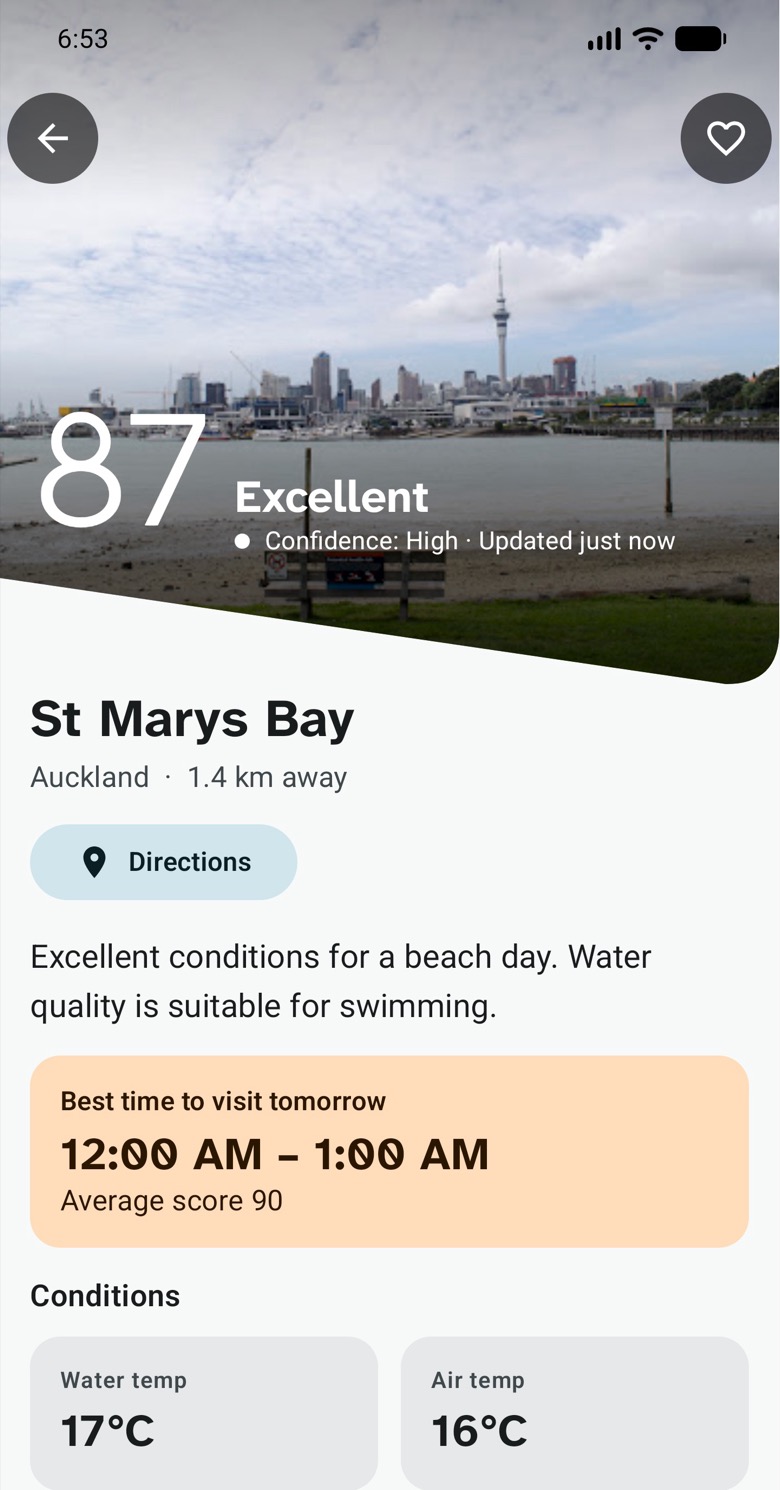
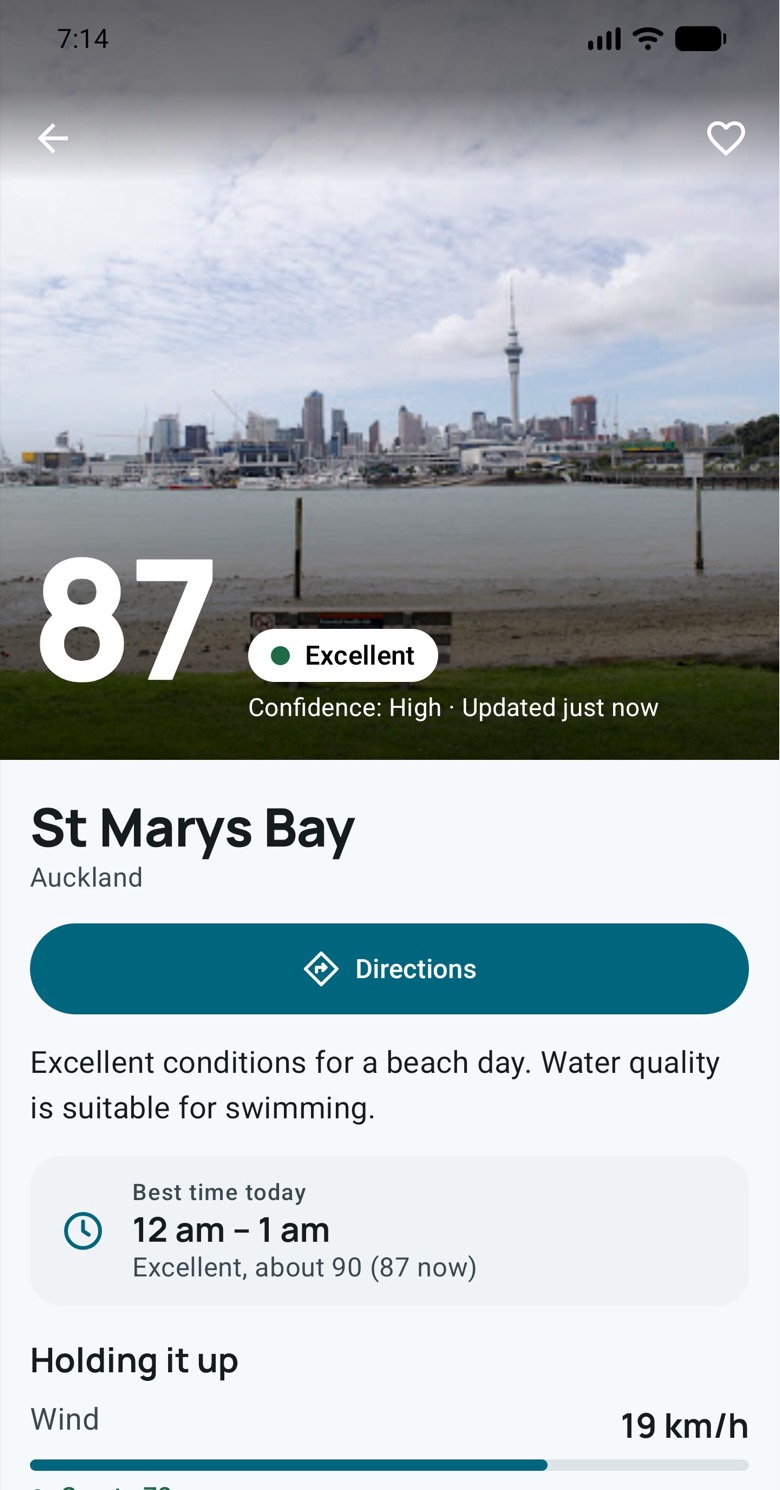
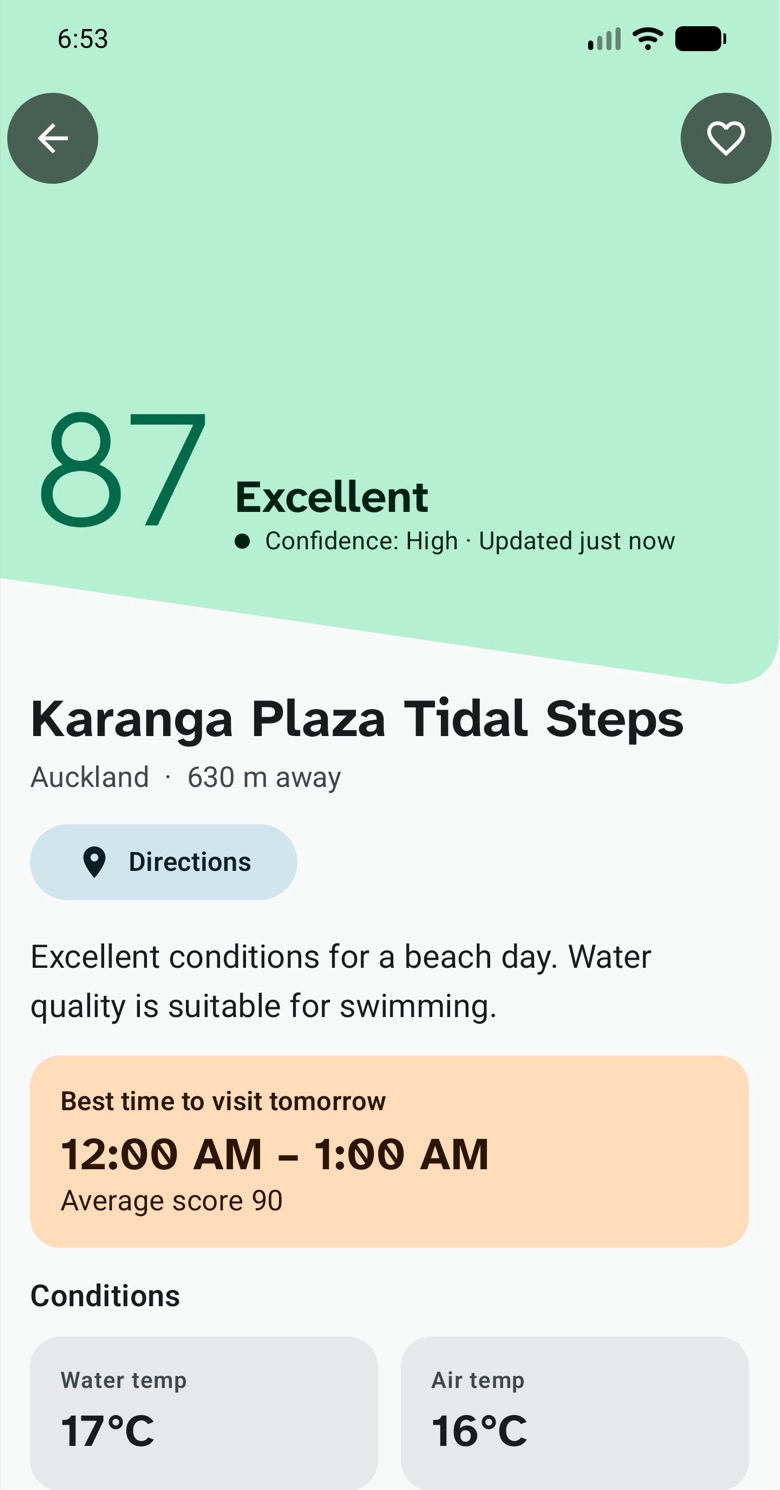
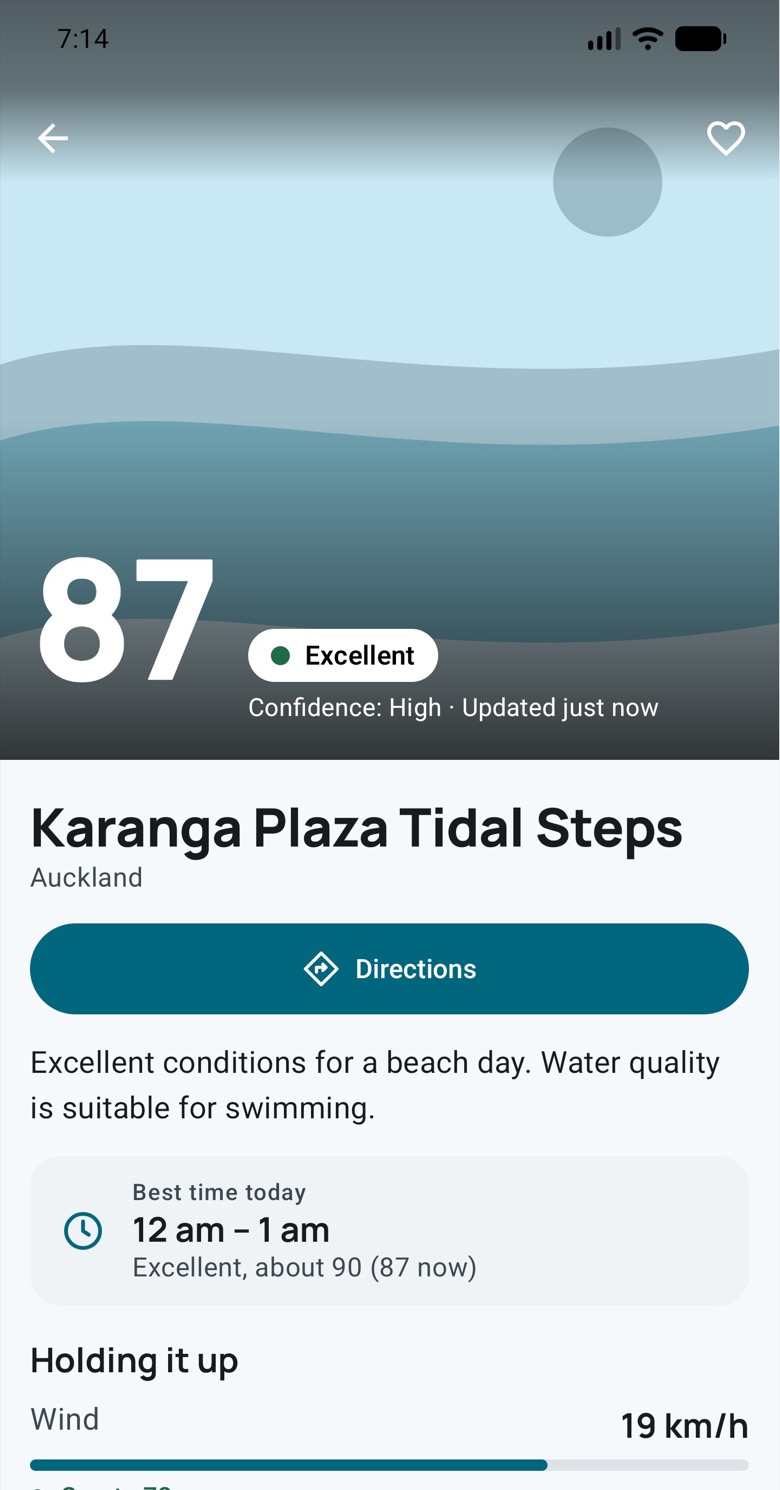
The same day-out app, yesterday and today. In between, the Design department built a new design system first, then restyled every screen and checked each one against the app it replaced.
Home, with photos
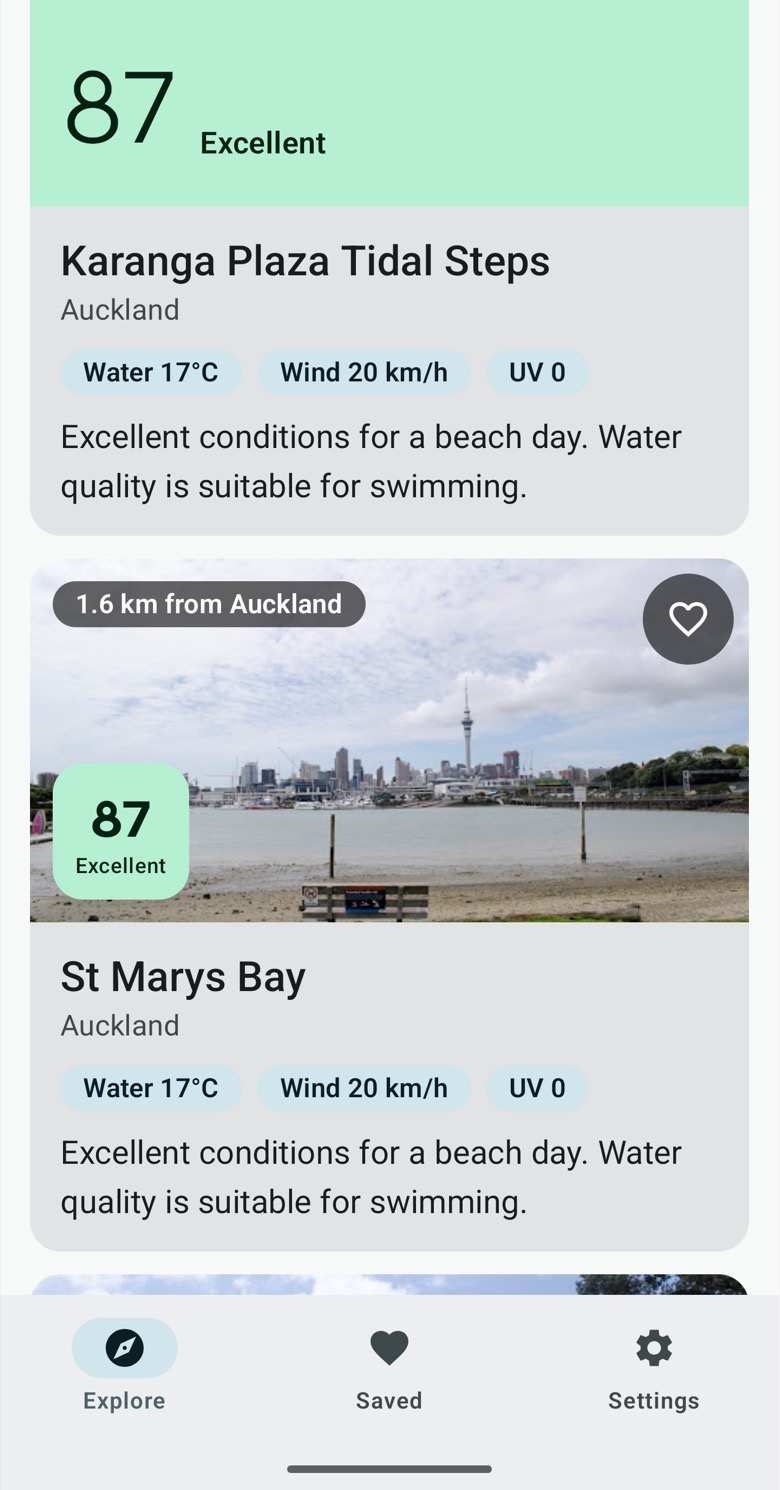
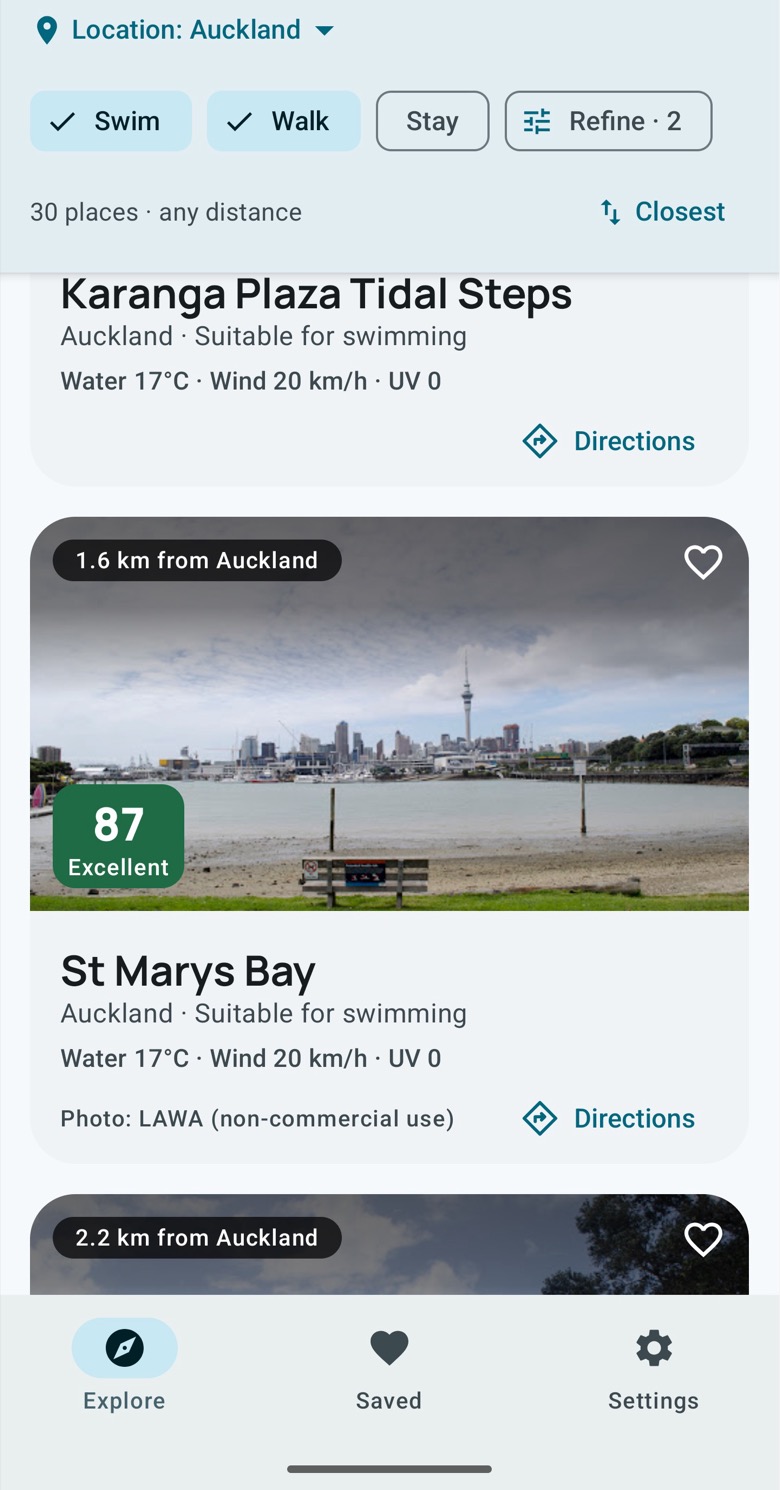
Home
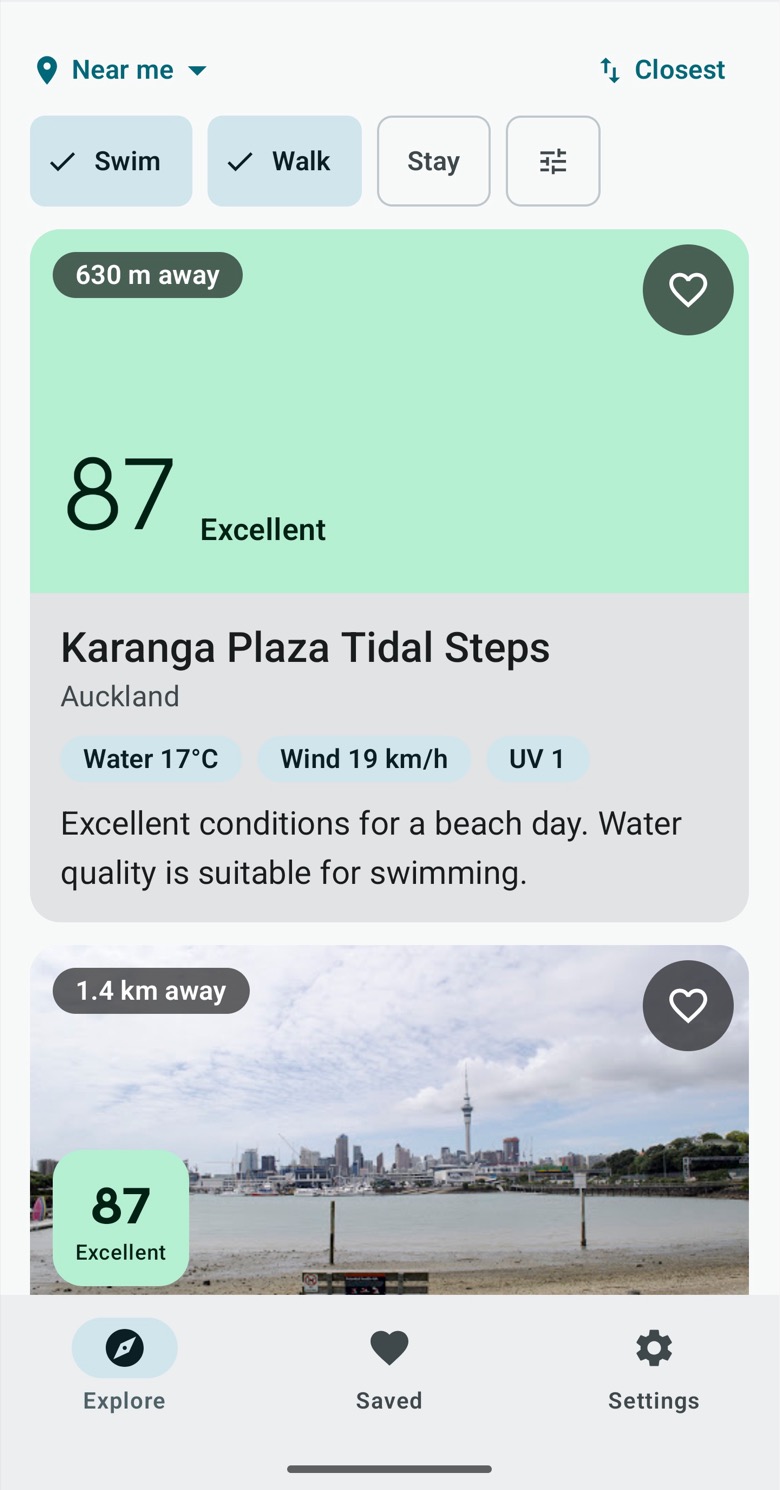
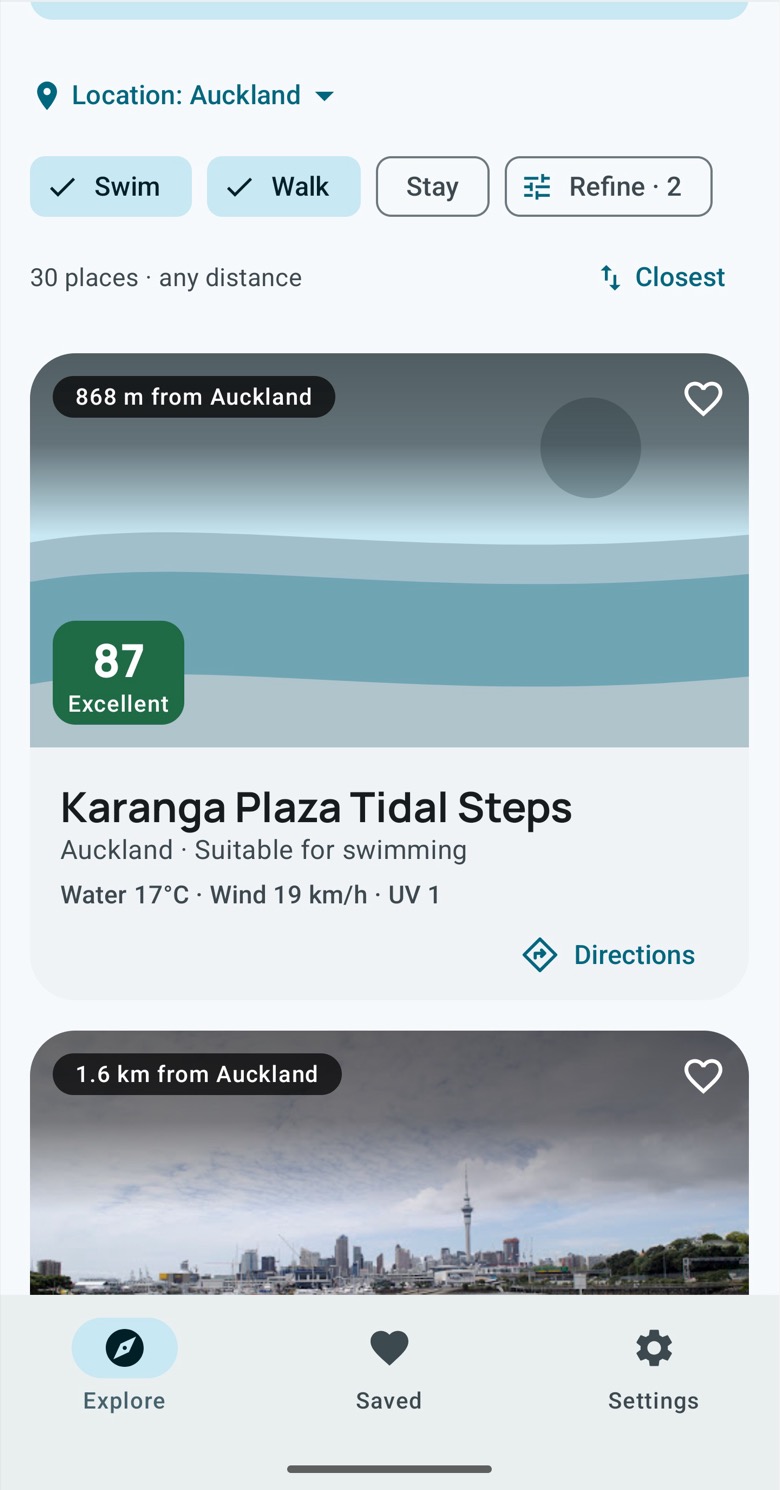
A place with a photo
A place without a photo
Settings
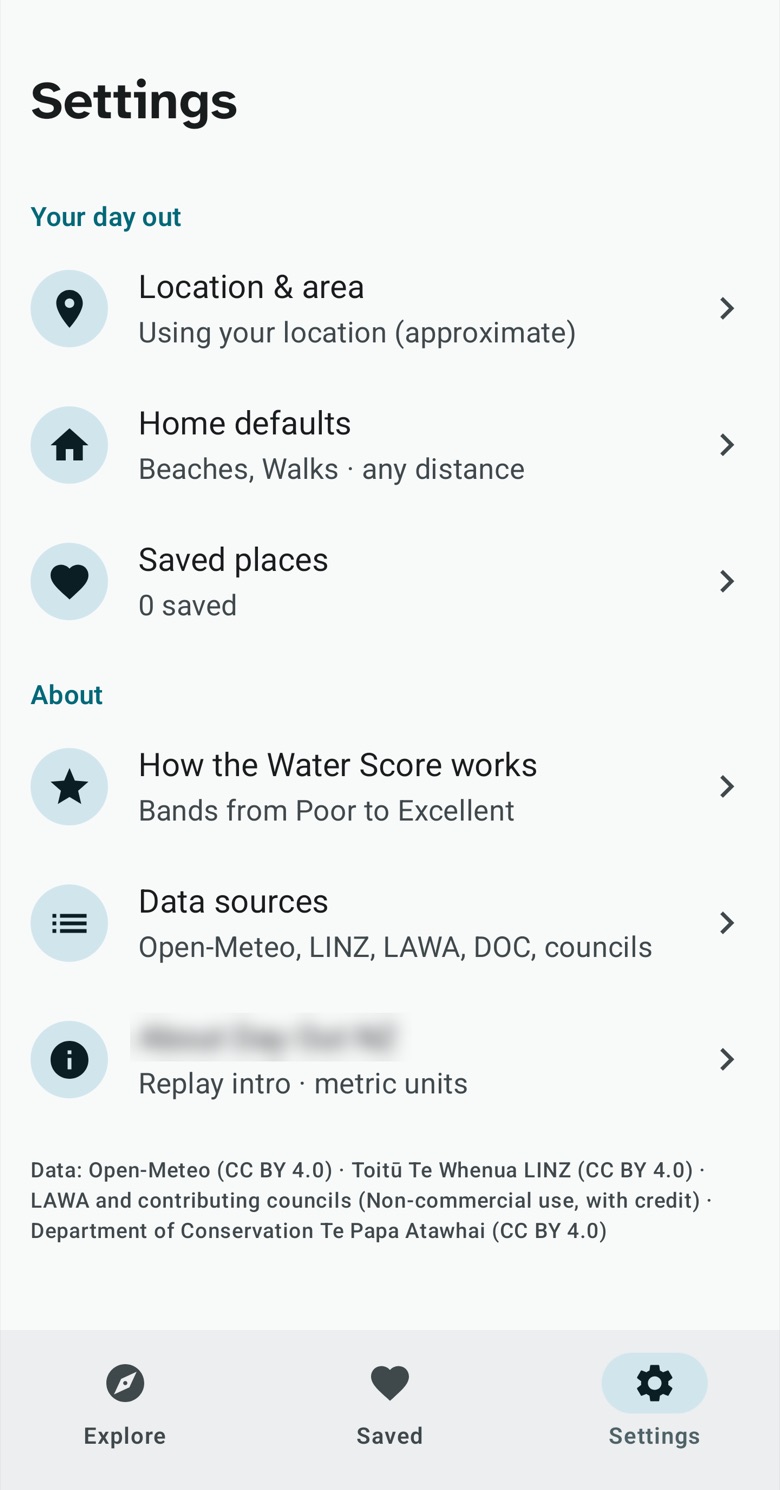
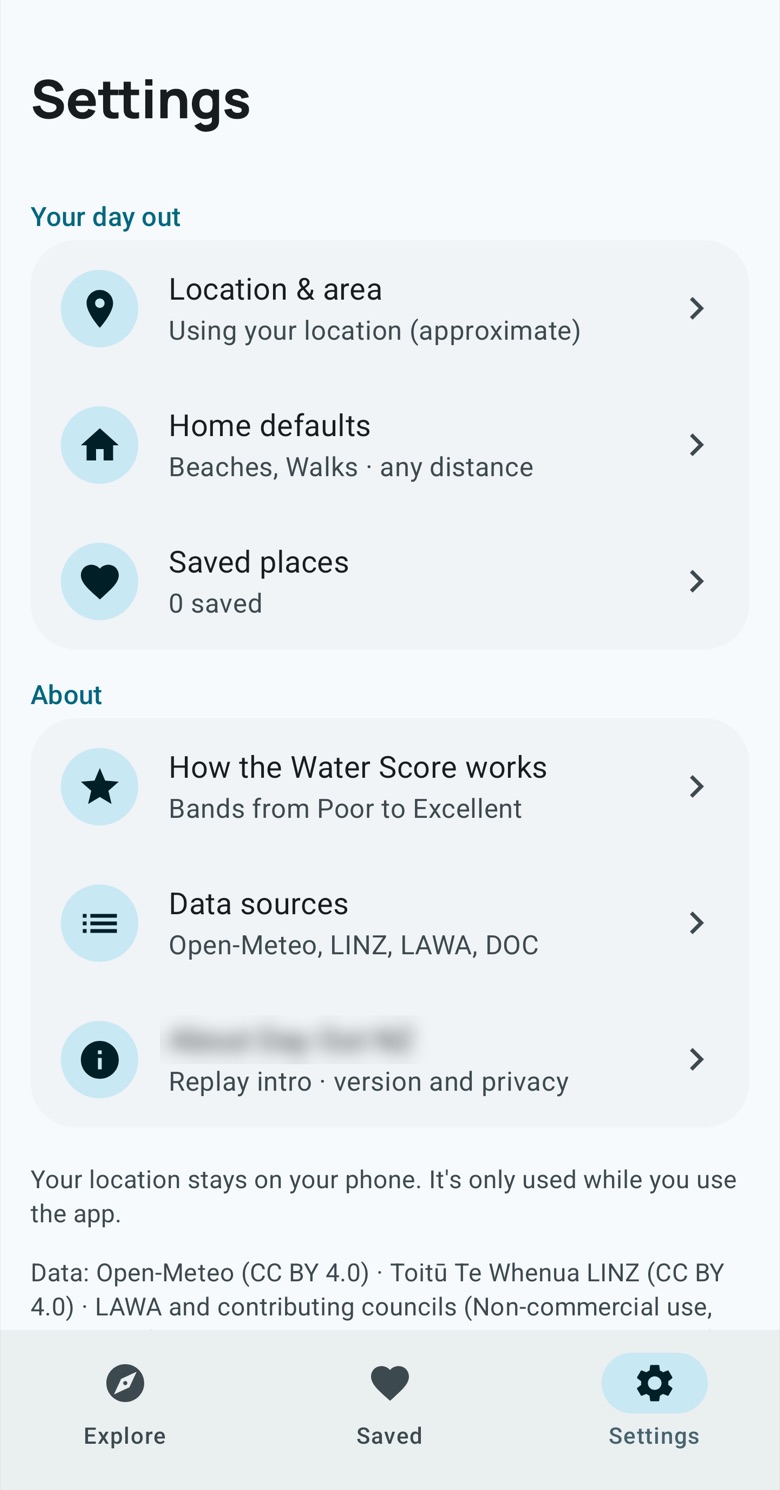
The design we nearly shipped
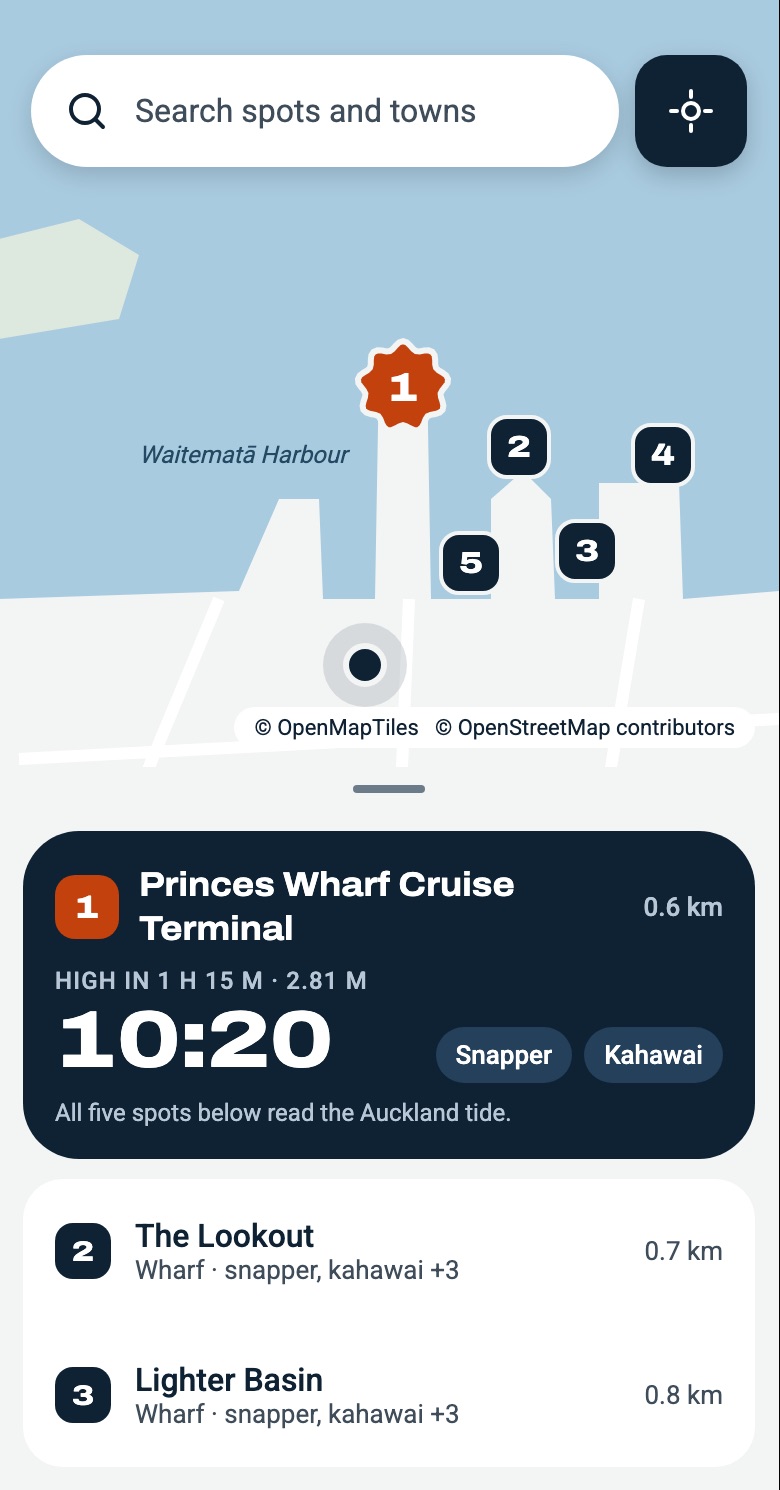
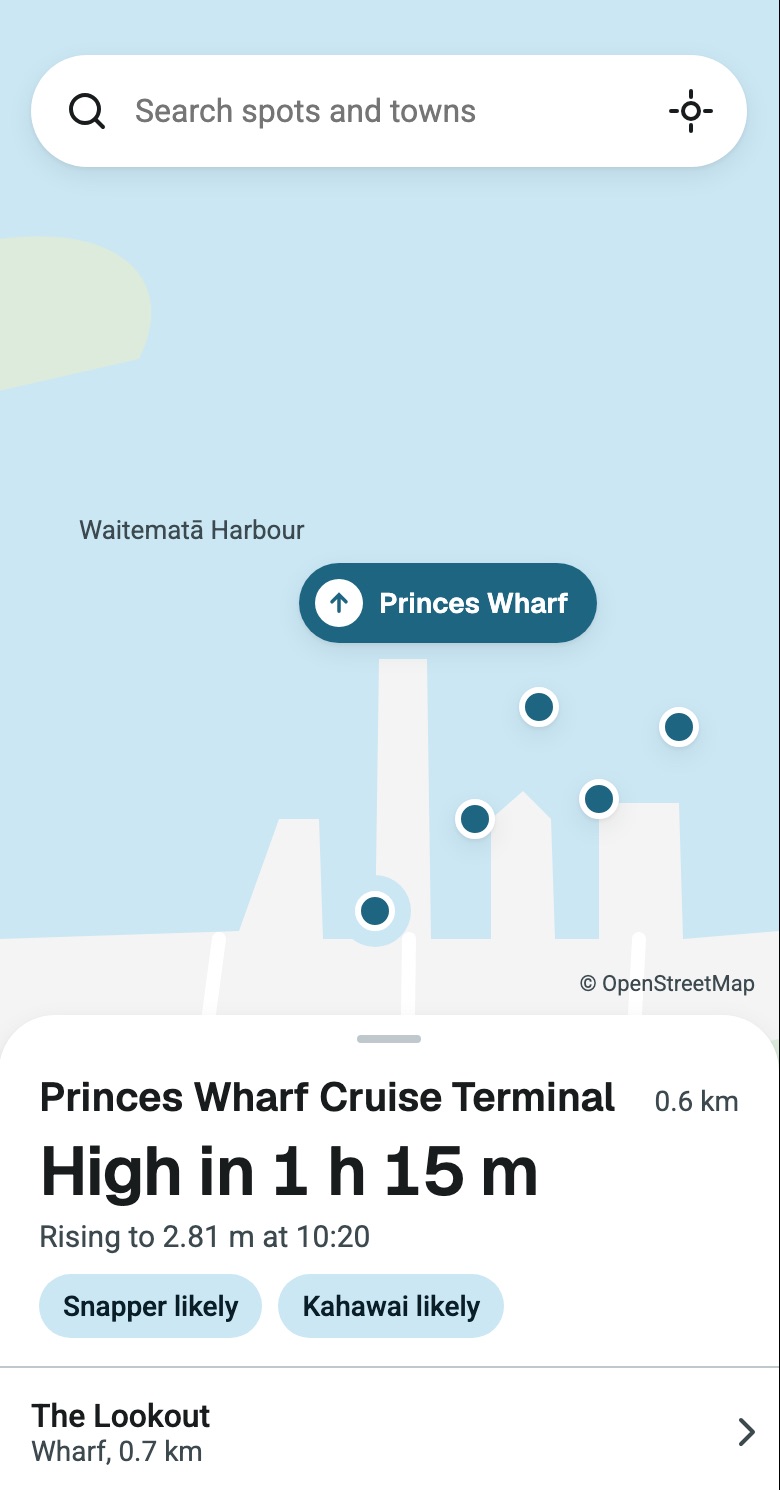
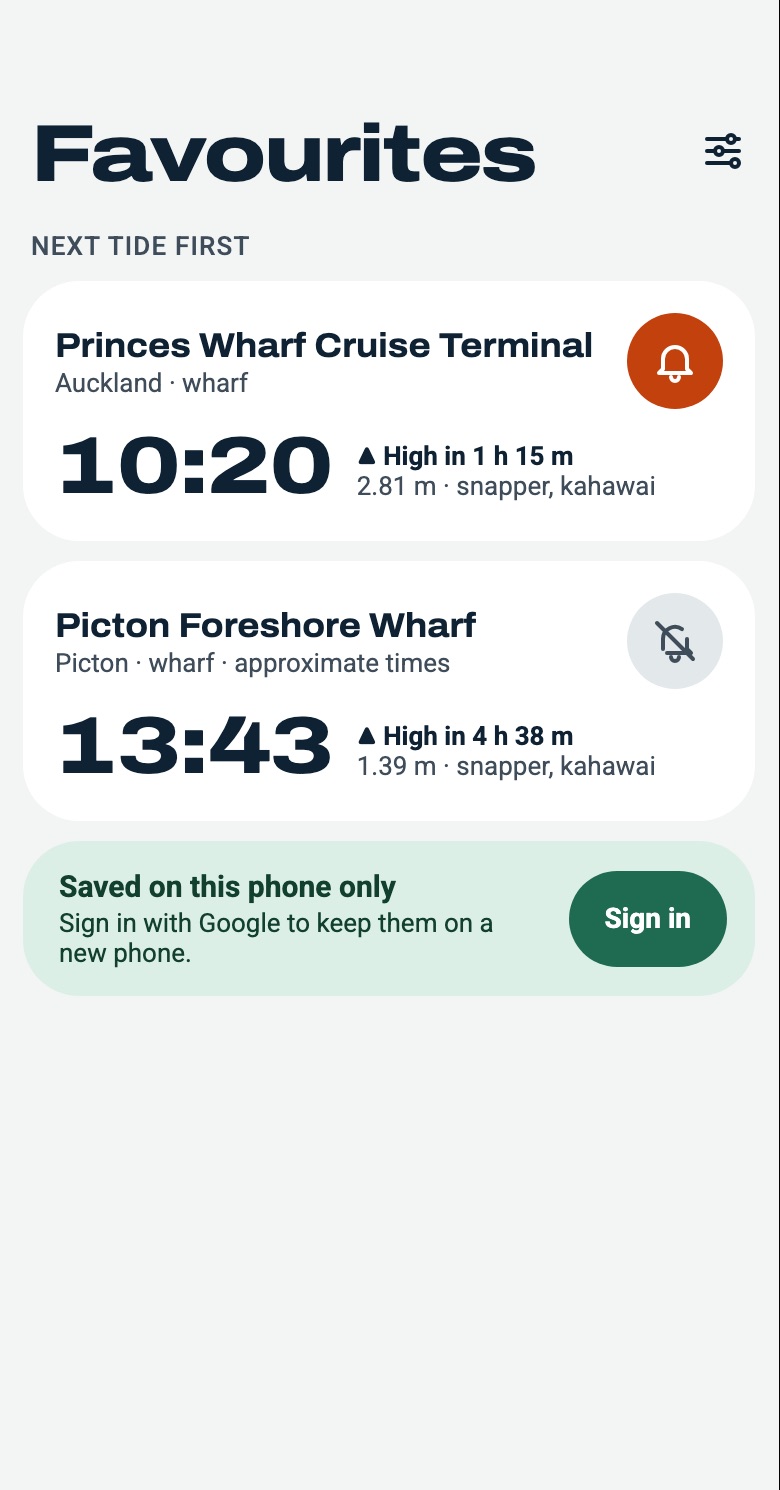
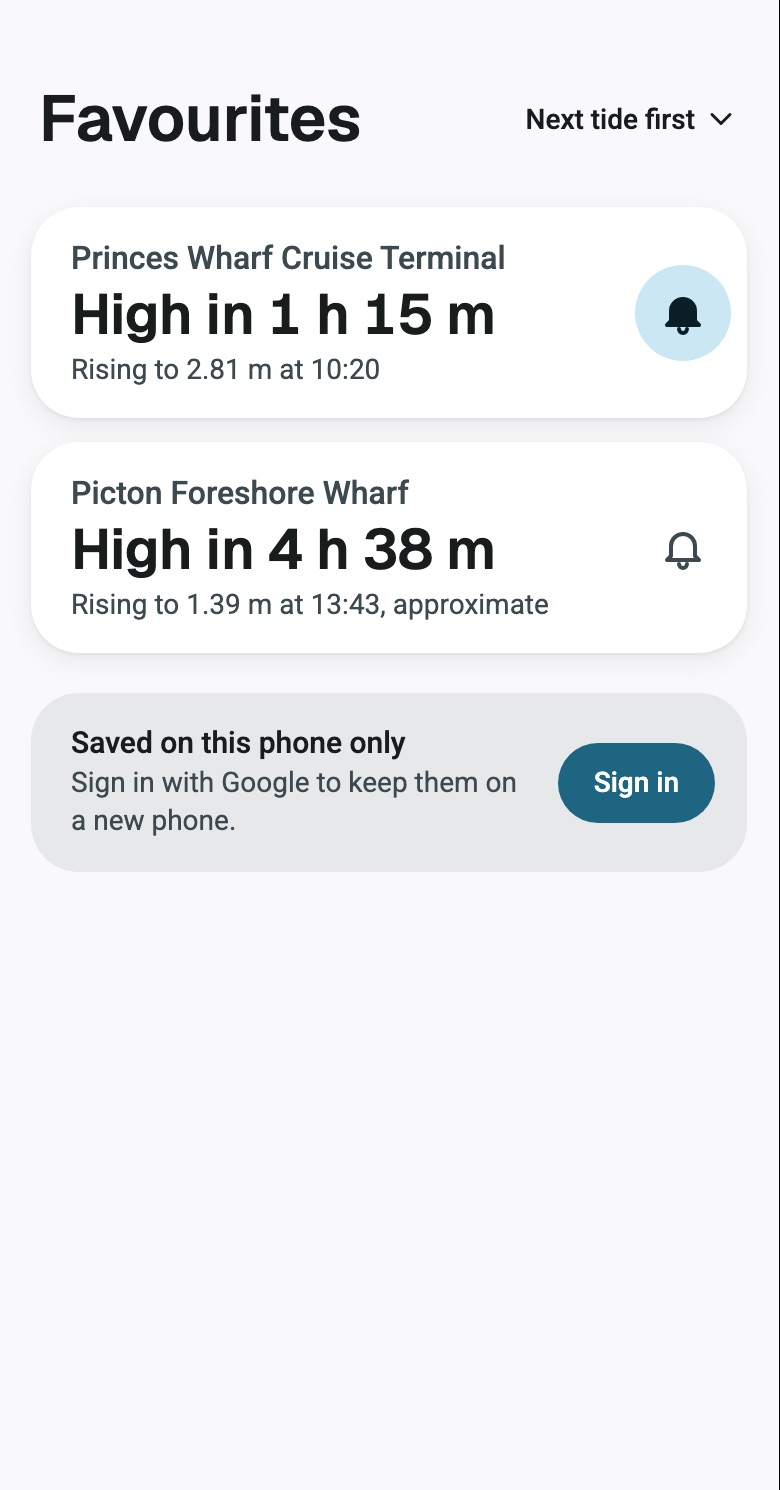
Mockups for a fishing app. The first set was heavy type, a dark hero and orange accents, and it nearly went ahead until the CEO sent it back as AI slop. The redo starts from what someone on a wharf is asking, and answers it in a sentence.
A fishing spot
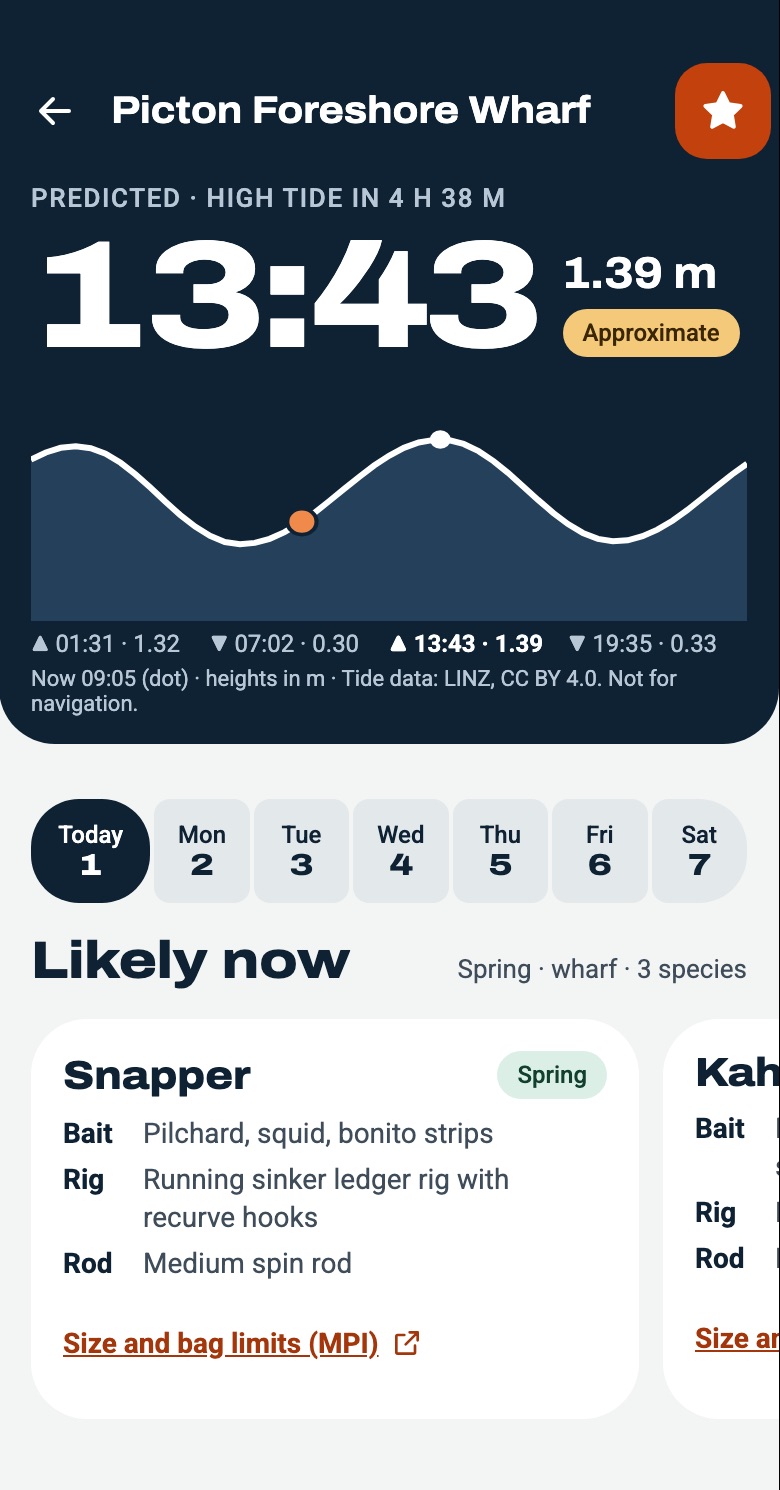
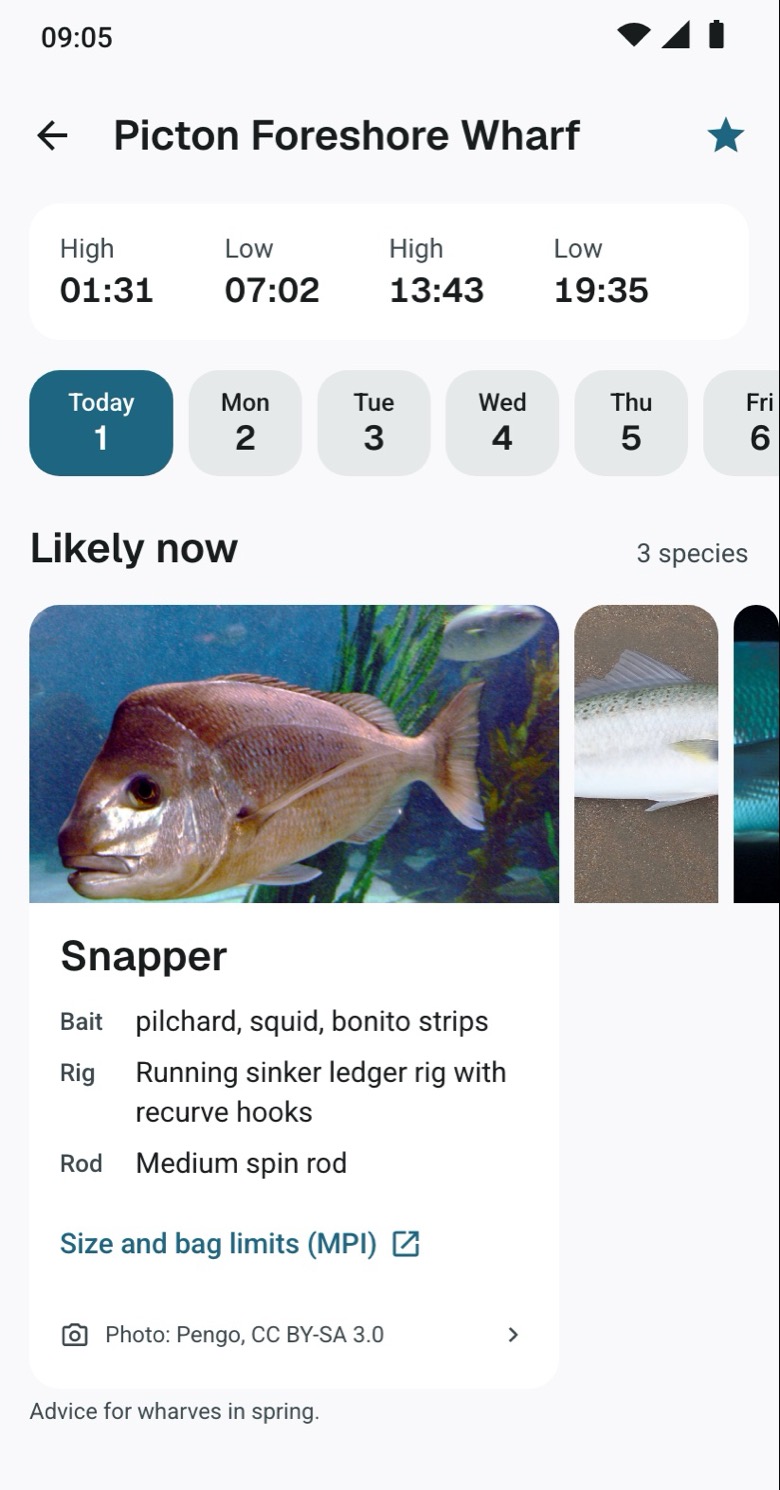
Map
Favourites
One app, two platforms
The latest Android and iPhone builds, side by side. Material on one, Liquid Glass on the other.
Search


A place


Choose an area


Every screen is scored out of 100
A separate reviewer scores each screen on ten parts of good design. Below 80 it goes back to Design. At 90 it can ship to the stores.
The designer never scores its own work.
The outcome
